Quickstart, v1
These are instructions for the old version. You should upgrade since version two is much better :)
Using Pikobeats
THESE are the OLD instructions. working on the new, 2.12.2025.
To begin, an overview of the pikobeatbox interface.
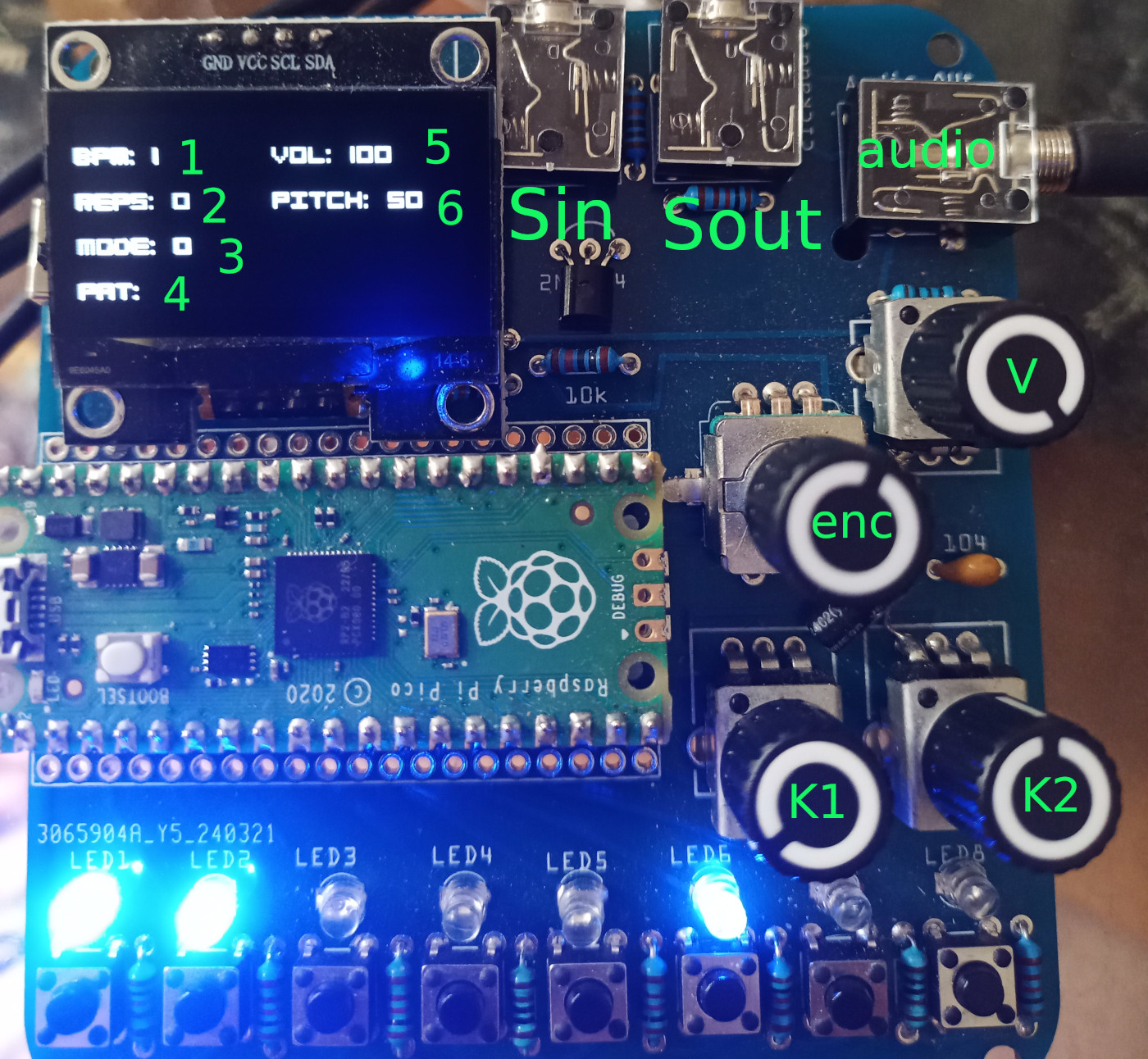
pikobeatbox layout
Display:
- BPM, starts up at 120 beats per minute
- REPS, repetitions of a pattern before it rotates
- MODE for input, 0-2
- PAT, pattern played by any one of the 8 samples
- VOL, volume of sample currently being modified
- PITCH of sample currently being modified
Knobs:
V is the global volume knob which also attenuates high end frequencies. ’enc’ is the encoder which is both an endless knob and a button. K1 and K2 are parameter pots used to change, for instance, volume of a sample.
By default, with nothing else held, turning ’enc’ changes the BPM. You can stop pikobeatbox but turning the BPM to 0 :)
With nothing else held, pushing the enc button changes the mode. See modes below.
Buttons & Leds:
The bottom row of buttons is used to assign parameters, like pattern and volume of the samples. They can also be used to trigger samples, in mode 3.
Audio outputs
- Sin is sync & audio in
- Sout is sync & audio out
- audio is stereo audio out. Volume regulated by knob V.
Modes & quickstart
On booting, pikobeatbox starts in mode ‘0’ with several samples running random patterns. Turn the ’enc’ knob to change the speed/bpm.
Mode 0 functions
- Hold button 1 which is playing and turn the ’enc’ knob a step or two clockwise and counterclockwise to change the sample being played. Depending on the sample set you will have between 20 and 30 samples to choose from.
- Hold button 1 and turn ‘K1’ knob to change pitch
- Hold button 1 and turn ‘K2’ knob to change volume
To switch modes, push the ’enc’ knob button. Switch to Mode 1.
Mode 1 functions
- Hold button 1 and turn the K2 knob. You should see a pattern update for button 1. This is a linear euclidean pattern.
- Hold button 1 and turn the K1 knob. You should see a pattern update for button 1. This is a random pattern. You can mix an match pattern types freely.
- Hold button 1 and turn the enc knob clockwise. This increases the number of repeats. The repeats function causes the pattern to be played the number of times you specify and then rotate by 4 steps. Basically, shuffle.
Push the ’enc’ knob button and switch to Mode 2.
Mode 2 functions
Currently mode 2 permits playing the buttons as triggers for the sample assigned there. If the sample isn’t currently playing, it will trigger and play.
In the next edition, mode 2 will have some additional features.
Syncing
Sin and Sout are compatible with pocket operators which have the sync click on the left and audio on the right channel.
If you connect a stereo cable from ‘Sout’ to a Pocketoperator audio input, set the PO to SY4 sync mode and the scarp with be master. This mode works really well. Turning it around, plug a PO stereo output to the scarp ‘Sin’, PO sync mode SY0, and scarp follows the PO. I find this mode less fun :) Currently sync timing seems better scarp -> PO, but it depends on the samples being used.