pikobeatbox quickstart
Installing firmware
If you haven’t already, install some. See the end of this page ;)
Using Pikobeats
Pikobeats interface is divided into 4 screens, mode 0 -3. First, an overview of display elements and mode 0 functions.
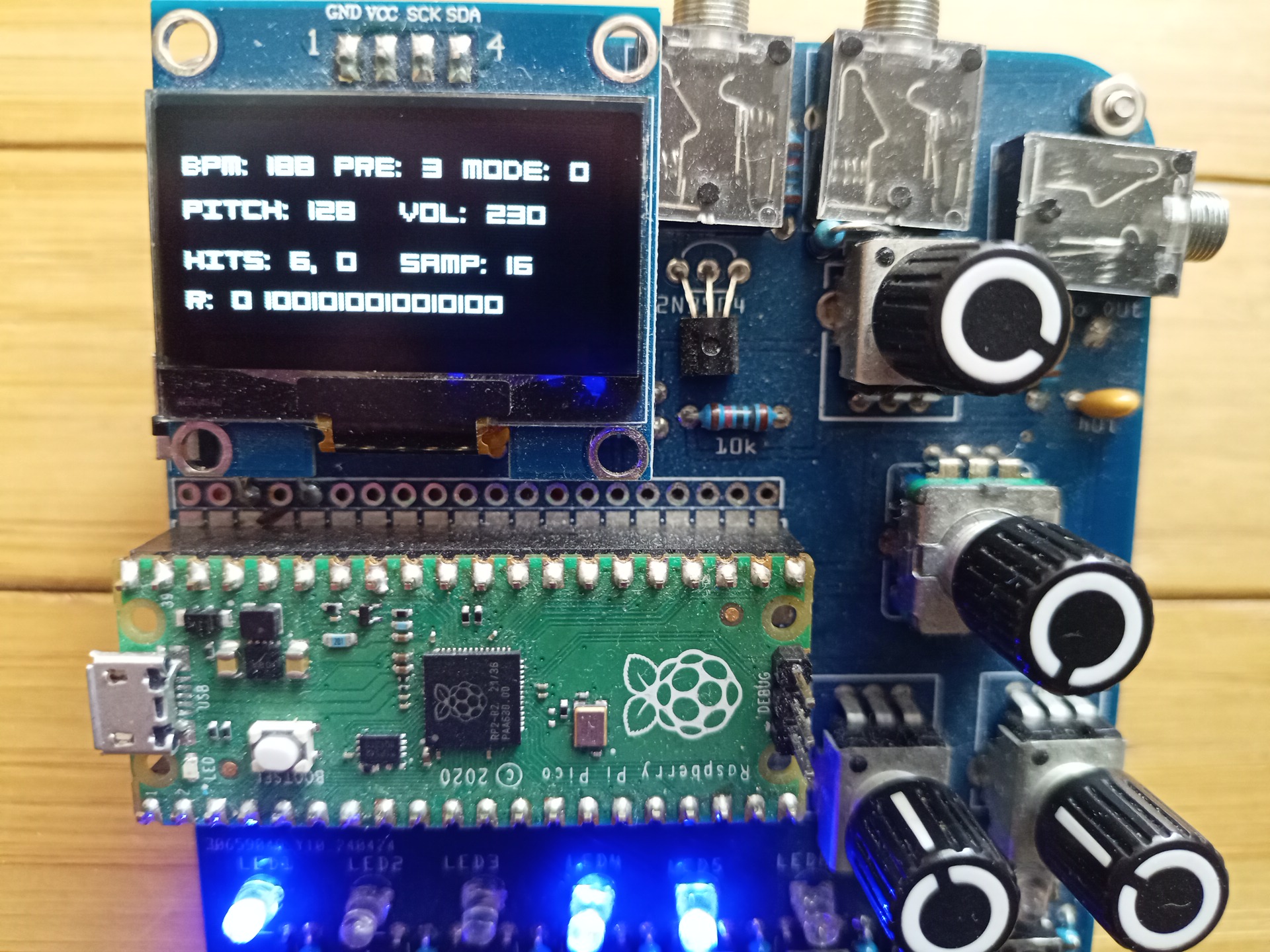
mode 0
Display layout:
Line one:
- BPM, starts up at 120 beats per minute
- PRE, preset, begins with last stored preset
- MODE, current input mode
Line two:
- PITCH of sample currently being modified
- VOL, volume of sample currently being modified
Line three:
- Hits (0-16) , offset (0-16)
- Sample of currently selected track
Line four:
- R, random or not (0 or 1)
- The current tracks pattern
Knobs:
V is the global volume knob which also attenuates high end frequencies. ’enc’ is the encoder which is both an endless knob and a button. K1 and K2 are parameter pots used to change, for instance, volume of a sample.
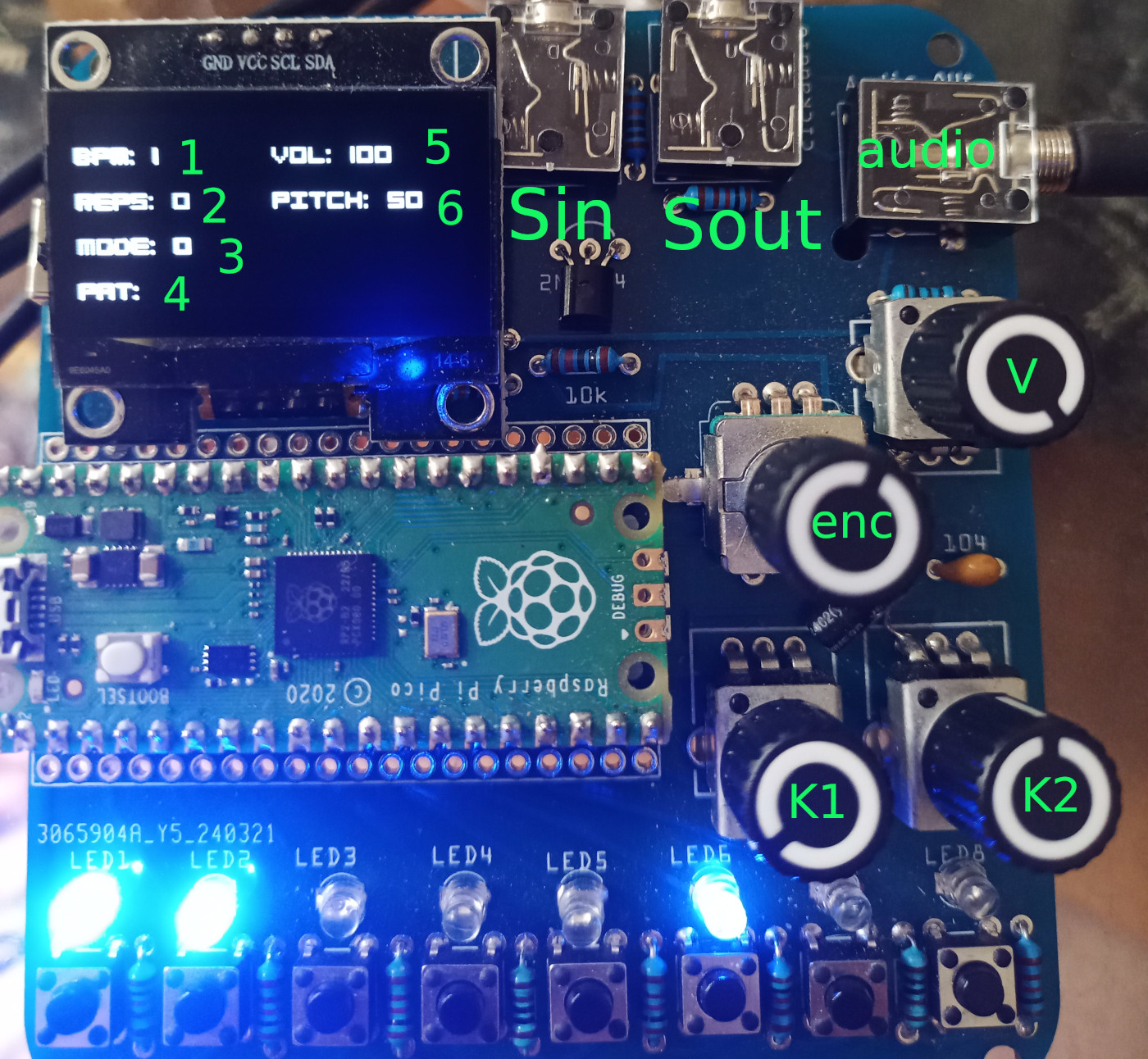
pikobeatbox layout
By default, with nothing else held, turning ’enc’ changes the BPM. You can stop pikobeatbox but turning the BPM to 0 :)
With nothing else held, pushing the enc button changes the mode. See modes below.
Buttons & Leds:
The bottom row of buttons is used to assign parameters, like pattern and volume of the samples. In any mode pressing the button switches the display to show the pitch, volume, hits, offset and pattern of that channel. They can also be used to trigger samples, in mode 2.
Audio outputs
- Sin is sync & audio in
- Sout is sync & audio out
- audio is stereo audio out. Volume regulated by knob V.
Modes & quickstart
On booting, pikobeatbox starts in mode ‘0’ with several samples running patterns from the last saved preset (or defaults from firmware).
Turn the ’enc’ knob to change the speed/bpm.
Mode 0 functions
- Hold a button for a track which is playing ( see it blink) and turn the ’enc’ to change the sample being played. Each chanel from 1-8 has 4 samples assigned.
- Hold button 1 and turn ‘K1’ knob to change pitch of
- Hold button 1 and turn ‘K2’ knob to change volume
To switch modes, push the ’enc’ knob button. Switch to Mode 1.
Mode 1 functions
- Hold a playing track button and turn the K1 knob. This creates a random pattern of pot position length for current track. The R: parameter display will show 1.
- Hold a track button & turn the K2 knob and you create a linear euclidean pattern of pot position length. The R: parameter display will show 0.
- Hold a track button and turn the enc knob to set the offset, displayed behind the HITS length value (8, 1 for 8 hits starting from the second beat).
Push the ’enc’ knob button and switch to Mode 2.
Mode 2 functions
Currently mode 2 permits playing the buttons as triggers for the sample assigned there. If the sample isn’t currently playing, it will trigger and play.
Mode 3 functions
Mode 3 allows you to save and restore. Using the enc you select between load and save. You can copy in that you simply select save and press another track button than the current selected PREset.
- In ’load’ state, push any track button to retrieve the settings for that channel
- In ‘save’ state, push any track button to save the current settings to that channel
Settings persist over restarts. On boot, pikobeats starts with the last saved preset.
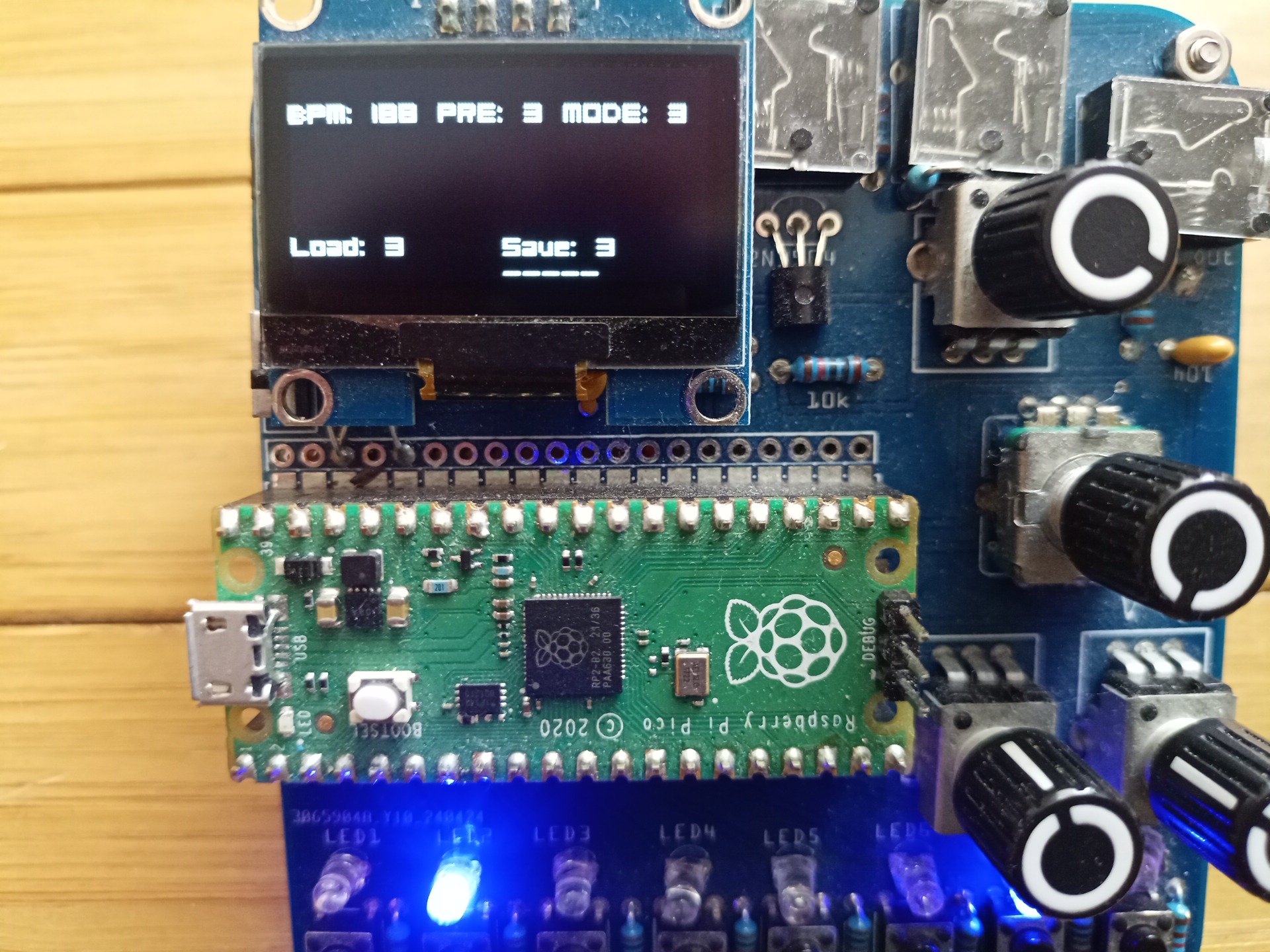
mode 3, load/save
Syncing
Sin and Sout are compatible with pocket operators which have the sync click on the left and audio on the right channel.
If you connect a stereo cable from ‘Sout’ to a Pocketoperator audio input, set the PO to SY4 sync mode and the scarp with be master. This mode works really well. Turning it around, plug a PO stereo output to the scarp ‘Sin’, PO sync mode SY0, and scarp follows the PO. I find this mode less fun :) Currently sync timing seems better scarp -> PO, but it depends on the samples being used.
pikocore
Well, you should go buy one from infinitedigits BUT, I’m working on a version for scarp. The firmware I supply works as documented here:
pikocore guide with only two differences:
- on scarp, the selector knob is absent, so you push the encoder button down and rotate while depressed to select which mode
- set bpm just by using the encoder without anything pressed
Synth Firmware
All 47 voices of the Braids Macro synth
MI braids on Scarp sha256sum abe6ebb134fc86bc150ac9b8ff98c94d380441e67931313c5370c24d9eeb3a09
Sampler Pikobeats Firmware
You can download several soundset versions of pikobeatbox here: The latest, 16.11.2025 listed here are now all 44kHz & 16 bit on a first gen pico. Cool.
This is a significant rewrite with 8 presets, preset saving, 32 samples (8 x 4) and the bit rate increase: mixed pickes sha256sum 05662c1c990d7be4a145b77eb56895287a1f9705fceccaad54c5e8958a4816e4
jungle drum samples sha256sum 0dc76ed66184ba28b08cb4a03207b8a51579f2cffe76b677e1cebbfd6574b88b
techno drum samples sha256sum 5fd564b83adb3994a5a074fa9ed411c0f4b5f35f9dd6b7d0831a4ea5b52da224
80s drum samples sha256sum 64d6c86ae4bd39b9d569ed4b4e6a76fcfa38cb41e8946a2190cc44e8a7efbfd8
Older version 1
beatbox samples sha256sum 7d170e8f0fb4b560c83dae09e3a91946792cece9d0fa29e028d118c8a9fb7024
80s drum samples sha256sum 99d795274b06e59d38c0fb21c4bae5caa0c03af4c9928d6817259f92e58cb09b
jungle drum samples sha256sum f5f54846022de4b826f29d9f1237bbc18ae6e7e6a541f25d80e245a1244809d3
Picokore sampler
These are picokore firmware (see bottom of page for info).
metal pikocore on scarp sha256sum 8a3394347d4f3d6a277855cf9fabd18f6fecb2ac3fdc7ef6a6b87154aca6a43e
romani funk sha256sum 56ecece96cd6dbe7aafb198c7441ba88c5b9b8d21f824676f89b80be3d6e601e
breakbeat loops sha256sum 3ee5506dddcb94a2aec510d1b8744d8cdfaa3151cd729154a39c0f6fcac5c6ae
Installing firmware
is as simple as holding the white ‘bootsel’ button on the pico, and plugging the usb into a computer. The pico will show up as a removable drive, RPI-RP2. Drag a uf2 file to the drive and it will reboot into that firmware as soon as the copy is finished. Easy.